<?xml version="1.0" encoding="UTF-8"?>

<upm-export>
	<title>ripnet.us</title>
	<link>https://ripnet.us</link>
	<description>My page about stuff</description>
	<pubDate>Wed Apr 22 15:21:52 2026 / +0000  GMT</pubDate>
	<generator>Universal Post Manager 1.1.2 [ www.ProfProjects.com ] </generator>
	<language></language>
	
			<item>
			<title>AEM UEGO Inline Converter</title>
			<link>http://ripnet.us/?page_id=15</link>
			<pubDate>Wed Apr 22 15:21:52 2026 / +0000  GMT</pubDate>
			<guid isPermaLink="false">http://ripnet.us/?page_id=15</guid>
			<content-encoded><![CDATA[This application will convert the AEM UEGO Inline version to a format that can be used by Cobb AccessTUNER. It will translate the outputted lambda at 19200 baud to AFR, and output that to another COM port at 9600 baud.

You will need to install this and com0com
<h2>com0com</h2>
You will need to install com0com to get this working. This software package will install a "pair of COM ports virtually connected by a null-modem cable." What does that mean? It provides the interface for the UEGO Converter to talk to AccessTUNER. See this picture:
<p style="text-align: center;"><a href="http://ripnet.us/wp-content/uploads/2013/06/UEGO-Diagram.gif"><img class="size-full wp-image-31 aligncenter" alt="UEGO-Diagram" src="http://ripnet.us/wp-content/uploads/2013/06/UEGO-Diagram.gif" width="583" height="158" /></a></p>
<p style="text-align: left;">Installation instructions for com0com can be found <a title="com0com Installation Instructions" href="http://ripnet.us/software/aem-uego-inline-converter/com0com-installation-instructions/">here</a>.</p>

<h2 style="text-align: left;">AEM UEGO Inline Converter</h2>
<h3>Instructions</h3>
The input COM port should be what directly connects to your AEM UEGO Inline. This will be the COM port that your serial-to-usb converter uses, or just your serial port (should you have such an old laptop). This is referred to as COMx in the above diagram.

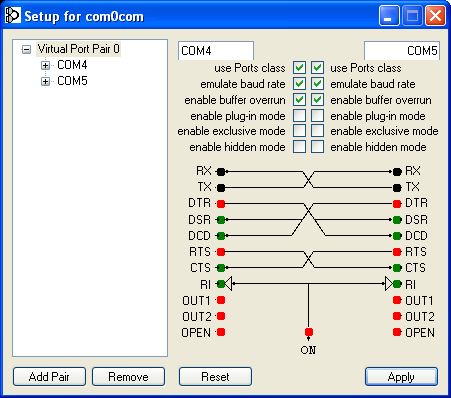
The output COM port should be the first of the two ports that com0com installed. This is referred to as COMy in the above diagram.

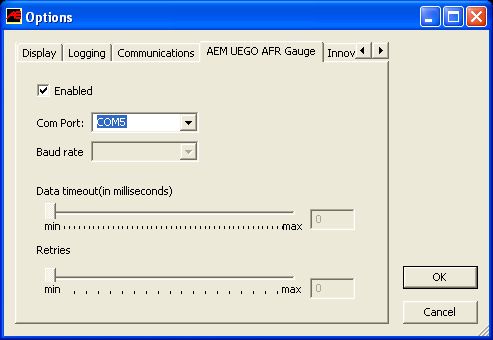
In Cobb AccessTUNER settings, you'll select COMz as the COM port under the tab "AEM UEGO AFR Gauge"
<h3>Example</h3>
In this example, COMy = COM4 and COMz = COM5

<a href="http://ripnet.us/wp-content/uploads/2013/06/capture_012_14062013_190007.jpg"><img class="size-full wp-image-49 alignnone" alt="capture_012_14062013_190007" src="http://ripnet.us/wp-content/uploads/2013/06/capture_012_14062013_190007.jpg" width="451" height="398" /></a>

My USB-to-Serial converter is on COM6

<a href="http://ripnet.us/wp-content/uploads/2013/06/capture_014_14062013_194133.jpg"><img class="alignnone size-full wp-image-68" alt="capture_014_14062013_194133" src="http://ripnet.us/wp-content/uploads/2013/06/capture_014_14062013_194133.jpg" width="521" height="273" /></a>

Cobb AccessTUNER is set to COMz (COM5 in this example)

<a href="http://ripnet.us/wp-content/uploads/2013/06/capture_013_14062013_192539.jpg"><img class="alignnone size-full wp-image-67" alt="capture_013_14062013_192539" src="http://ripnet.us/wp-content/uploads/2013/06/capture_013_14062013_192539.jpg" width="493" height="340" /></a>

&nbsp;

Start the converter. If it's working properly, you'll see your current AFR/Lambda

<a href="http://ripnet.us/wp-content/uploads/2013/06/capture_015_14062013_194216.jpg"><img class="alignnone size-full wp-image-69" alt="capture_015_14062013_194216" src="http://ripnet.us/wp-content/uploads/2013/06/capture_015_14062013_194216.jpg" width="521" height="273" /></a>

Start the Dashboard to confirm that AccessTUNER is working:

<a href="http://ripnet.us/wp-content/uploads/2013/06/capture_017_14062013_194658.jpg"><img class="alignnone size-full wp-image-70" alt="capture_017_14062013_194658" src="http://ripnet.us/wp-content/uploads/2013/06/capture_017_14062013_194658.jpg" width="516" height="355" /></a>

&nbsp;
<h2>Download</h2>
<div class='w3eden'><!-- WPDM Link Template: Default Template --><div class="wpdm-link-tpl link-btn light" data-durl="https://ripnet.us/?wpdmdl=133" >    <div class="media">        <div class="pull-left"><img class="wpdm_icon"   src="https://ripnet.us/wp-content/plugins/download-manager/file-type-icons/blank.png" /></div>        <div class="media-body"><strong class="ptitle">AEM UEGO Inline Converter <span class="label label-default" style="font-weight: 400;">260.00 KB</span></strong>            <div><strong><a class='wpdm-download-link wpdm-download-locked [btnclass]' rel='noindex nofollow' href='https://ripnet.us/?wpdmdl=133'><i class=''></i>Download AEM UEGO Inline Converter</a></strong></div>        </div>    </div></div><div style="clear: both"></div></div>

&nbsp;]]></content-encoded>
			<excerpt-encoded><![CDATA[]]></excerpt-encoded>
			<wp-post_id>15</wp-post_id>
			<wp-post_date>2013-06-14 13:16:53</wp-post_date>
			<wp-post_date_gmt>2013-06-14 17:16:53</wp-post_date_gmt>
				</item>
</upm-export>
